
🚀 Introducing Performance Testing: Load Test Your APIs with Simple YAML Configuration
Democratize Quality with AI-Powered Performance Testing

The world of performance testing just got a whole lot simpler! I'm excited to announce a game-changing addition to the Playwright MCP YAML (Democratize Quality) framework: Performance Testing Capabilities powered by Artillery MCP integration.
Gone are the days of complex performance testing setups. Now you can define, execute, and analyze load tests using simple YAML configurations, just like you would with UI and API functional tests.
🎯 What's New?
The framework now supports basic performance testing using Artillery MCP integration, allowing you to:
Define performance test scenarios in YAML - Keep it simple and readable
Simulate multiple users - Test realistic load conditions
Generate enhanced reports - Get actionable recommendations
Integrate with existing test suites - Unified testing approach
📋 Prerequisites
Before diving into performance testing, ensure you have the complete setup:
1. System Requirements
Node.js: Version 14 or higher
npm: Version 6 or higher
Operating System: Windows, macOS, or Linux
2. Install Core Components
# Install the main framework
npm install -g playwright-mcp-yaml-test

# Install Gemini CLI
npm install -g @google/gemini-cli
3. Configure Gemini CLI
Run the gemini command in your terminal and follow the authentication setup instructions. For detailed configuration, refer to the official Google Gemini CLI documentation.
Optional: Set your preferred Gemini model:
export GEMINI_MODEL=gemini-2.5-flash
4. Update Gemini Settings for Performance Testing
Create or update your .gemini/settings.json file to include the Artillery MCP server:
{
  "theme": "GitHub",
  "selectedAuthType": "oauth-personal",
  "mcpServers": {
    "playwright-mcp": {
      "command": "npx",
      "args": [
          "@democratize-quality/playwright-mcp",
          "--user-data-dir", "gemini-playwright",
          "--save-trace",
          "--output-dir", "test-artifacts",
          "--caps", "api_session_report,api_session_status,api_request"
      ]
    },
    "artillery-mcp": {
      "command": "npx",
      "args": [
          "@democratize-quality/artillery-performance-mcp-server",
          "[path/to/your/folder]"
      ]
    }
  },
  "autoAccept": true
}
⚠️ Security Note: Make sure to add .gemini/settings.json to your .gitignore file for best security practices.
🏗️ Setting Up Your Performance Test Structure
Create the following directory structure in your project:
project-root/
├── .gemini/
│   └── settings.json
├── steps/
├── test-cases/
├── test-suites/
📝 Creating Your First Performance Test
Let's walk through creating a performance test using the JSONPlaceholder API as our example target.
Step 1: Define Environment Variables
Create a .env.performance file:
# Performance testing environment
PERF_TEST_URL=https://jsonplaceholder.typicode.com
TEST_DURATION=60
USERS_PER_SECOND=5
Step 2: Create the Performance Test YAML
Create test-cases/jsonplaceholder-api-perf.yml:
name: "JSONPlaceholder API Performance Test"
description: "Test how well the JSONPlaceholder website handles multiple users at the same time"
type: "performance"
tags:
  - performance
  - api
  - simple
environment_variables:
  - PERF_TEST_URL
  - TEST_DURATION
  - USERS_PER_SECOND
steps:
  - "Create Artillery Performance Test Scenario for the website at {{PERF_TEST_URL}}"
  - "Include GET /posts endpoint (retrieve posts) in the scenario"
  - "Include POST /posts endpoint (create a new post) in the scenario"
  - "Include GET /posts/1 endpoint (retrieve a specific post) in the scenario"
  - "Include PUT /posts/1 endpoint (update a specific post) in the scenario"
  - "Set Test Duration as {{TEST_DURATION}} seconds"
  - "Simulate {{USERS_PER_SECOND}} new users every second"
  - "Run the Artillery tests with enhanced reporting"
  - "Analyze the results and provide stakeholder-friendly recommendations"
🚀 Running Your Performance Tests
Basic Execution
# Run the performance test case
playwright-mcp-yaml-tester --environment performance --test-case performance-tests/jsonplaceholder-api-perf.yml


# Run all performance tests
playwright-mcp-yaml-tester --type performance
Advanced Execution Options
# Run with custom environment variables
USERS_PER_SECOND=10 TEST_DURATION=120 playwright-mcp-yaml-tester --test-case performance-tests/jsonplaceholder-api-perf.yml

# Run with debug output
DEBUG=true playwright-mcp-yaml-tester --environment performance --test-case performance-tests/jsonplaceholder-api-perf.yml
📊 Understanding Your Results
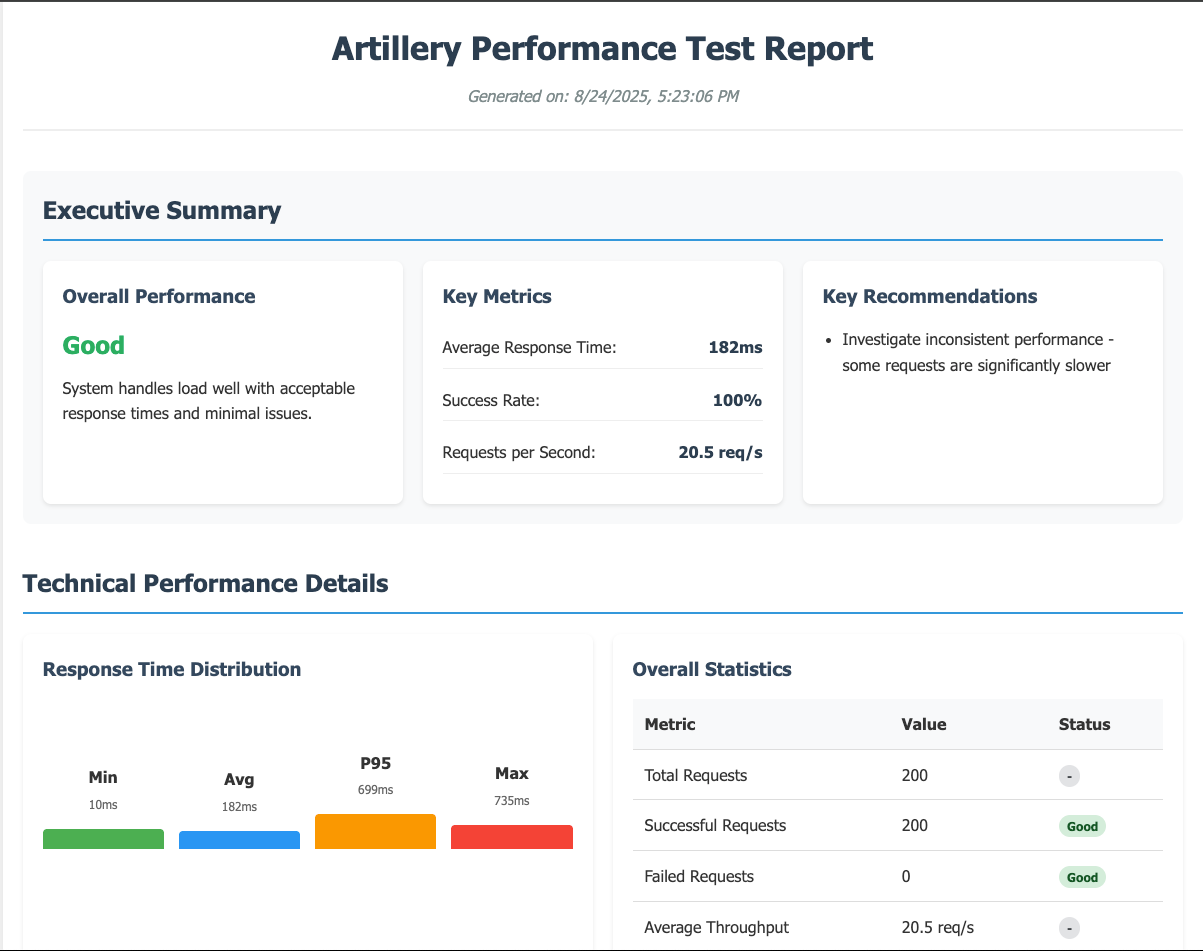
After running performance tests, you'll get:
1. Enhanced Reports
Comprehensive HTML reports with visual graphs
Performance metrics including response times, throughput, and error rates
Stakeholder-friendly recommendations for performance improvements
2. Key Metrics to Monitor
Response Times: Average, median, 95th percentile
Throughput: Requests per second
Error Rates: Failed requests percentage
Concurrent Users: Simulated load levels
3. Actionable Insights
The AI-powered analysis provides recommendations such as:
Identifying bottlenecks
Optimization suggestions
Scalability recommendations
Performance baseline establishment
🎯 Real-World Performance Testing Scenarios
Scenario 1: API Endpoint Load Testing
Perfect for testing REST APIs under various load conditions:
steps:
  - "Create Artillery Performance Test Scenario for {{API_BASE_URL}}"
  - "Include authentication endpoints"
  - "Include CRUD operations"
  - "Simulate realistic user behavior patterns"
  - "Generate performance baseline report"
Scenario 2: Gradual Load Increase
Test how your system handles increasing load:
steps:
  - "Start with {{MIN_USERS}} users per second"
  - "Gradually increase to {{MAX_USERS}} users per second"
  - "Monitor response times during scale-up"
  - "Identify breaking point and performance degradation"
🔧 Best Practices for Performance Testing
1. Test Environment Considerations
Use dedicated performance testing environments
Ensure consistent network conditions
Monitor system resources during tests
2. Test Data Management
Use realistic test data volumes
Implement proper test data cleanup
Consider data freshness for accurate results
3. Baseline Establishment
Run performance tests regularly
Establish performance baselines
Track performance trends over time
4. Load Testing Strategy
Start with baseline load
Gradually increase load to find limits
Test both sustained and spike loads
⚠️ Important Disclaimer
Please use target environments and applications at your own discretion and responsibility when running performance tests.
Performance testing can generate significant load on target systems. Always ensure:
You have proper authorization to test the target system
You're not testing production systems without approval
You understand the potential impact on system resources
You comply with terms of service of external APIs
You have monitoring in place during test execution
🎉 What's Next?
This performance testing capability opens up exciting possibilities:
Integrate with CI/CD pipelines for automated performance validation
Combine with functional tests for comprehensive quality assurance
Create performance regression suites to catch performance degradations early
Build performance monitoring dashboards using the generated reports
🏁 Conclusion
The addition of performance testing to the Playwright MCP YAML framework represents a significant step forward in democratizing quality assurance. By using simple YAML configurations, teams can now easily:
Set up comprehensive performance tests
Generate actionable insights
Integrate performance testing into their quality workflows
Make data-driven decisions about system scalability
The power of AI-driven test execution combined with the simplicity of YAML configuration makes performance testing accessible to everyone on the team, not just performance testing specialists.
Ready to start load testing your APIs? Install the framework, configure your environment, and begin exploring the performance characteristics of your applications today!
Have questions about performance testing or want to share your experience? Drop a comment below or reach out on social media. Happy testing! 🚀
Links: